
Boost productivity and speed up tasks with Wroke’s smart automation
Save your time and effort and reduce human errors with Wroke’s integrated automation system, continuously supporting your team at every stage of the project to ensure smooth and highly accurate workflow.

What Is Automation In Wroke?
Get ready to experience smarter, easier project management where automation saves time and energy to achieve outstanding results.
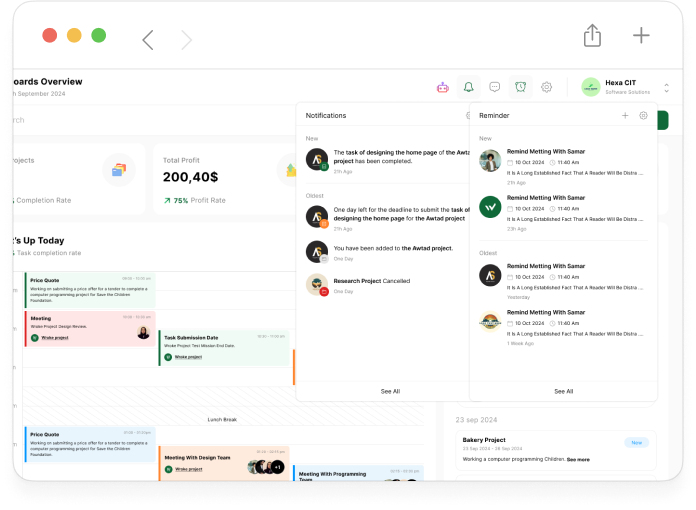
The automation feature in Wroke is a vital tool designed to transform daily workflows into smart, sequential processes that run automatically without the need for continuous human intervention. By automating repetitive and routine tasks, Wroke helps teams focus more on strategic and creative work that requires human thinking, while the system handles actions quickly and accurately. Wroke’s automation capabilities include pre-scheduling tasks, sending automatic alerts and notifications, updating task statuses automatically, and seamlessly linking different processes within the project. Integration with other tools on the platform creates a unified work environment that facilitates team collaboration, improves communication, and reduces errors caused by manual work. This intelligent approach to automation contributes to accelerating work pace, enhancing output quality, and ensuring adherence to schedules, thereby boosting team productivity and increasing project success rates. Ultimately, automation in Wroke makes project management more flexible and efficient, saving the time and effort needed to consistently achieve outstanding results.
Discover the benefits that make Wroke automation the best
Through smart and advanced automation, Wroke delivers solutions that boost your team’s efficiency and accelerate task completion with accuracy and effectiveness.

Routine Task Automation
Wroke’s automation feature allows you to execute all repetitive and routine tasks automatically without the need for continuous human intervention, relieving your team’s daily workload and saving time and effort so the team can focus on more important and creative tasks.

Instant Notifications
The system provides smart, real-time alerts for any updates in task statuses or approaching deadlines, ensuring no important milestone is missed and helping organize work schedules more accurately and effectively.

Smart Scheduling
This feature enables you to precisely set task deadlines in advance, allowing tasks to be executed automatically according to the scheduled timeline without constant supervision, ensuring smooth workflow and timely completion.

Automatic Status Updates
The system automatically changes task statuses based on work progress or completion of certain stages, making it easier for all team members to track project progress without the need for manual updates, ensuring full transparency in real-time.

Integration with Other Tools
This feature allows seamless connection between Wroke’s automation system and other applications and tools you use daily, creating an integrated work environment that facilitates smooth information flow and enhances collaboration across different teams.

Advanced Reporting & Analytics
The system provides detailed reports and accurate analytics on team performance and workflow, enabling you to identify strengths and weaknesses and make strategic decisions based on actual data that boost project productivity and quality.

Reduction of Human Errors
By automating repetitive and complex processes, the chances of mistakes caused by manual intervention are significantly reduced, ensuring high levels of accuracy and quality in task execution, which contributes to enhancing team reputation and customer satisfaction.

Time & Effort Saving
Automation accelerates task completion rates and minimizes the need for manual involvement in daily operations, freeing your team to focus on high-value tasks and increasing overall production efficiency.

Support for Team Collaboration
This feature facilitates communication among team members by enabling real-time tracking and updates of shared tasks, boosting cooperation and coordination to ensure aligned goals and harmonious execution.

Flexible Automation Rules Configuration
The system gives you the freedom to create and customize advanced automation rules tailored to your project’s needs and your team’s workflow, allowing you to design a smart, flexible process that can be easily adjusted to accommodate project changes and evolving requirements.
How does automation work in Wroke?
The mechanism of automatically executing tasks through predefined rules and conditions to ensure an organized and efficient workflow without continuous manual intervention.
Wroke turns automation into speed and effortless execution.

Automation in Wroke relies on predefined rules and triggers that activate automatic actions within the project, eliminating the need to perform routine tasks manually. Users begin by creating automation rules that link a specific condition (such as a task status change, adding a comment, or approaching a due date) to a defined action (like sending a notification, updating a status, or assigning a new task). When the condition is met, the platform executes the programmed action immediately or according to a set schedule, ensuring continuous workflow without interruption or delay. Multiple automation rules can also be linked together to create integrated sequences that simplify the management of complex projects. Wroke’s automation also supports integration with other tools, allowing seamless data transfer and updates between different systems, thus providing a cohesive and synchronized work environment. Thanks to this mechanism, human errors are reduced, team response speed improves, and the focus shifts to making strategic decisions instead of performing routine tasks.